FEATURES
ZoomScheduler addresses the major challenges facing driving school softwares today
.jpeg)
The Dashboard
The dashboard provides real-time insight to key metrics about your driving school. Information in the dashboard is updated constantly to provide valuable analytics into daily activities.
-
Number of appointments for the day
-
Number of appointments confirmed and/or cancelled
-
Number of appointments by services
-
Number of appointments by instructors
-
Online Sales
-
Student Management / Portal
-
Calendar
-
Website Integration
-
Online Booking / Payment
-
Instructor Payroll
-
Class Management
-
Vehicle Assignment
-
Fleet Management
-
Customize Email Notifications
-
Manage Multiple Locations
Schedule Management
Schedule appointments for driving lessons, road tests and other services. Each appointment includes details for student pick-up and drop-off location, road test date/time and location, next lesson number and contact information.
-
Smart Scheduling
-
Track Lessons by Time
-
Multiple Staff Schedulers
-
Multiple Schedule Views
.png)
.png)
CDL Preficiency Tracker
Class A ELDT Behind-the-Wheel Proficiency Tracker
Simplify compliance and track student progress effortlessly with built-in Entry-Level Driver Training (ELDT) assessments designed to meet 49 CFR Part 380, Appendix A standards. This tool enables instructors to record range and public road lesson scores, log clock hours, evaluate key maneuvers—from pre-trip inspections to backing and hazard perception—and verify proficiency with official certification signatures.
Student Chat
Chat instantly with your students right within the platform. Every conversation is automatically saved to their profile, creating a seamless history that’s always at your fingertips.


Electronic Signature
Students can now electronically sign terms & conditions—in person or remotely via a secured link. Signed documents are automatically saved to their profile for easy access and compliance.
Waiting List
Filter. Notify. Fill spots—effortlessly. Use our new one-click filter to organize students by service type, then let automatic SMS alerts notify the next in line in seconds.

Invoices / Receipts
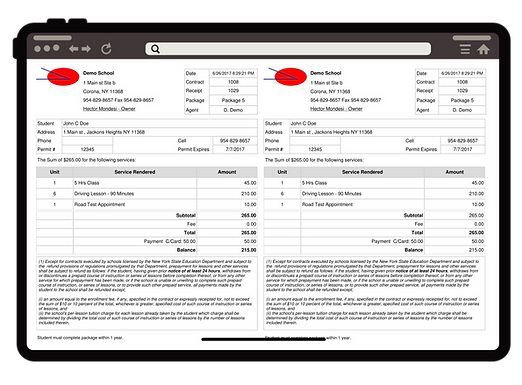
Generate invoices, payment receipts:
-
Receipts are consecutively numbered automatically.
-
Customizable fine print verbiage.
-
Can be customized for your state.
Notifications
Notifications are sent automatically as a way to keep your students engaged during the learning process.
-
Reminders are sent via text and email 24 or 72 hours in advance.
-
Welcome emails are sent to new students.
-
Congratulation emails sent for passing road test.
-
Happy birthday email.

